
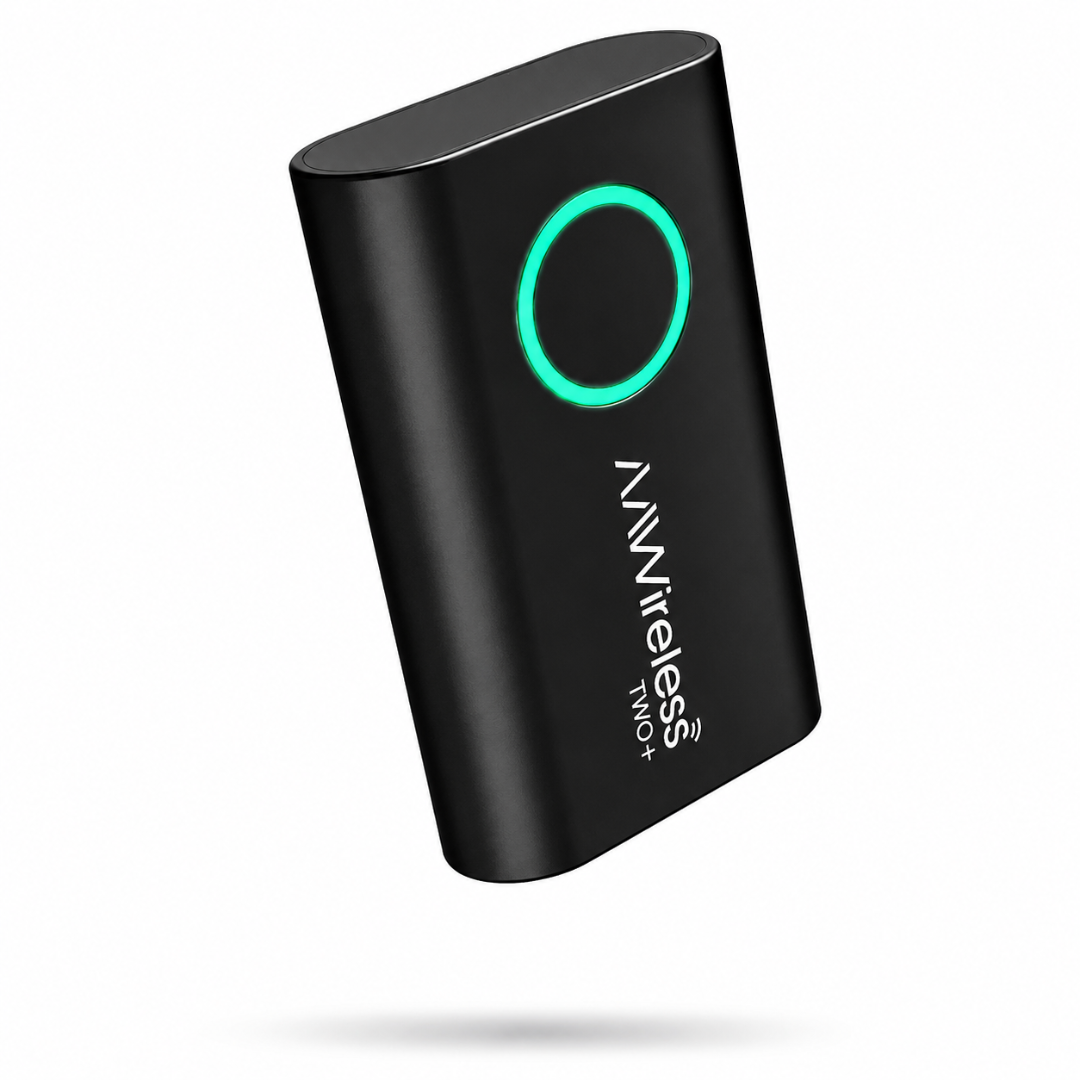
If your car only supports Android Auto or Apple CarPlay through a USB cable, the AAWireless TWO+ removes the cord for good. Plug it into your car’s USB port once, pair your phone through Bluetooth and Wi-Fi, and every drive after that connects automatically, wirelessly, the moment you get in.
What sets the TWO+ apart from a standard wireless adapter is that it works with both Android Auto and Apple CarPlay on the same device. In a household or shared car where one driver has an iPhone and another has Android, that matters. A single tap on the adapter’s multifunctional button pairs a new phone, switches between already-paired phones, or puts the adapter into standby. There is no limit on how many phones you can pair, which makes the TWO+ a practical fit for families, rideshare drivers, or anyone who lends their car out.
Setup takes minutes and doesn’t require touching your car’s factory wiring or replacing your head unit. Once paired, the AAWireless companion app (iOS and Android) lets you customize button behavior, run the built-in troubleshooter, and keep the adapter updated with the latest firmware, so it keeps working as new phones and Android Auto versions roll out.
Who the AAWireless TWO+ is for
- Drivers with a wired-only Android Auto or CarPlay head unit who don’t want to buy a new car stereo
- Shared or multi-driver vehicles where phones switch between iPhone and Android
- Anyone tired of cable wear, awkward phone placement, or forgetting a charging cable in the car
- Road-trippers who want to hand the aux over to a passenger without unplugging anything
Important: check compatibility first
The AAWireless TWO+ only works with cars and aftermarket head units that already support wired Android Auto and/or Apple CarPlay. It does not work with vehicles that already have built-in wireless Android Auto or CarPlay. To check, plug your phone into your car’s USB port: if Android Auto or CarPlay launches, your car is compatible.
Top Features
- Wireless Android Auto and Apple CarPlay in a single adapter
- Pair and switch between unlimited phones with one button
- Plug-and-play setup, no wiring changes to your car
- Companion app for firmware updates, button customization, and troubleshooting
- Compact, discreet design that stays out of the way
Compatibility
- Works with cars and aftermarket head units that support wired-only Android Auto and/or Apple CarPlay
- Requires Android 11 or higher for wireless Android Auto
- Requires iPhone X or newer for wireless CarPlay
- Not compatible with vehicles that already have built-in wireless Android Auto or CarPlay
Specifications
| Spec | Detail |
|---|---|
| Dimensions | 5.5 × 3.5 × 1.5 cm |
| Weight | 18 g |
| Connectivity | Bluetooth & Wi-Fi |
| Port | USB-C |
| Compatible with | Wired Android Auto & Apple CarPlay systems |
What’s in the Box
- 1x AAWireless TWO+ adapter
- 1x USB-C to USB-A cable
- 1x Quick-start manual
Frequently Asked Questions
- Is the AAWireless TWO+ compatible with my car? It’s compatible with any car or aftermarket head unit that supports wired-only Android Auto or Apple CarPlay. Plug your phone into your car’s USB port; if Android Auto or CarPlay opens, the TWO+ will work.
- Can I use the AAWireless TWO+ with both an iPhone and an Android phone? Yes. The TWO+ supports wireless Apple CarPlay and wireless Android Auto on the same adapter, and you can pair multiple phones of either type and switch between them with the button.
- Does my car need to already have wireless Android Auto or CarPlay? No, the opposite. The TWO+ is built for cars that only have wired Android Auto or CarPlay. If your car already has native wireless support, the adapter is not needed and is not compatible.
- How many phones can I pair to one adapter? There’s no set limit. You can pair multiple phones and switch between them instantly using the multifunctional button, which makes it a good fit for shared or family vehicles.
- What’s the warranty on the AAWireless TWO+? The adapter is covered by a 2-year warranty and a 30-day return period.
- Do I need the companion app to use it? No, the adapter works plug-and-play out of the box. The app is optional and used for updates, button customization, and troubleshooting.
Reviews
There are no reviews yet.